Convert WordPress to GoHighLevel: The 2026 Migration Guide
Are you tired of “plugin hell”? If you are running your business on WordPress, you know the drill: updating plugins every Tuesday, paying for separate hosting, worrying about security patches, and trying to get your contact form to actually talk to your CRM.
In 2026, business owners are moving away from scattered tools. They want a “Single Source of Truth.” That is why thousands of users are choosing to Convert WordPress to GoHighLevel.
GoHighLevel (GHL) isn’t just a website builder; it’s an all-in-one CRM and marketing automation platform. In this guide, we will show you exactly why you should move, how to do it without losing your data, and how to thrive once you arrive.
Overview of WordPress in 2026
WordPress has been the king of the web for decades. It is powerful and flexible. However, for a modern business owner, it can feel like owning an old car that needs a mechanic every week. To make WordPress work like a modern marketing machine, you usually need:
Each of these costs money and adds “bloat” to your site, making it slow.
Read this: GHL Workflows and AI Agents: Build Your AI Workforce in 2026
Why Move from WordPress to GoHighLevel?
The main reason to move is Consolidation. When you move to GHL, you replace your website, your funnel builder, your email marketing, and your calendar system with one login.
Key Benefits of GoHighLevel
Once you convert your site, you unlock features that WordPress requires expensive plugins for:
Comparison Table: WordPress vs. GoHighLevel
| Feature | WordPress (WP) | GoHighLevel (GHL) |
| Hosting | Paid Separately | Included |
| CRM | Plugin / Third-Party | Native & All-in-One |
| Security | Your Responsibility | Managed by GHL |
| Funnel Building | Extra Plugin (Elementor) | Native Drag-and-Drop |
| Automation | Requires Zapier | Built-in Workflows |
| Monthly Cost | $$$ (Variable) | **$$ (Fixed)** |
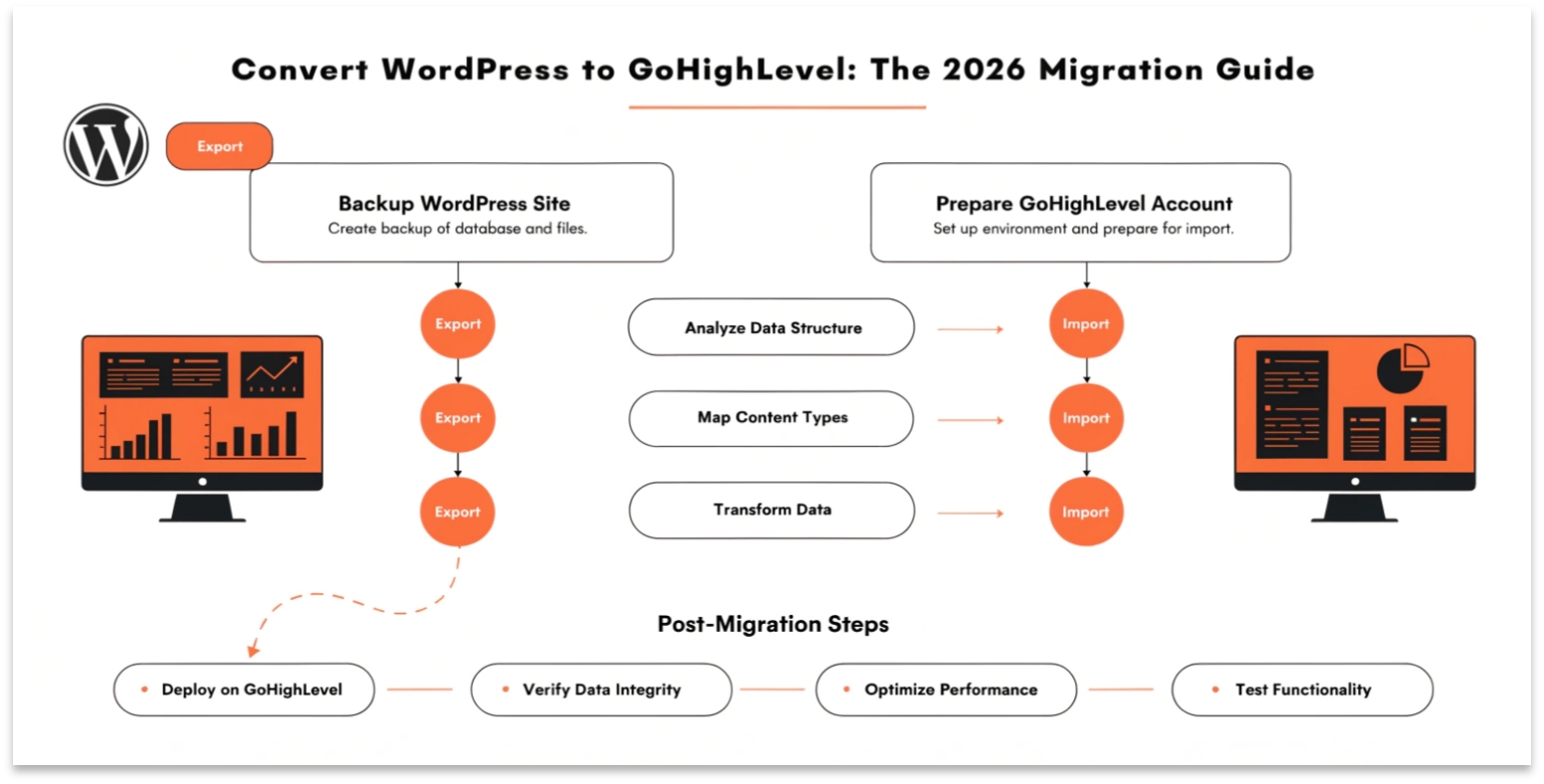
Step-by-Step Migration Process
The WordPress to GoHighLevel migration doesn’t have to be scary. Follow these steps for a smooth transition:
Audit Your Current Site
Look at your current WordPress site. Which pages are actually making you money? You don’t need to move every single old blog post. Focus on your high-traffic landing pages and contact forms.
Set Up Your GHL Account
Before you move, ensure your GHL CRM setup is ready. Set up your brand colors and typography in the “Global Styles” section of the GHL builder.
Rebuild the Pages
Use the AI Site Builder to recreate your pages.
Import Your Contacts
Export your users from WordPress (as a CSV) and import them into GHL. This is the perfect time to set up Custom Objects if you have complex data like property listings or car models.
Connect Your Domain
Go to your domain registrar (like GoDaddy or Namecheap) and point your A-records or CNAME to GoHighLevel. GHL provides an easy-to-follow wizard for this.
Migration Checklist
Common Challenges & Solutions
Use Cases for Migration
Pro Tips for a Smooth Migration
FAQs
How long does a WordPress to GoHighLevel migration take?
For a standard 5-page business website, it usually takes about 4–6 hours to recreate the pages and test the automations.
Will I lose my Google rankings?
Not if you use 301 Redirects. This tells Google that your page has moved from a “.php” or “.html” URL to your new GHL URL.
Can I keep my WordPress blog and use GHL for funnels?
Yes! Many people keep their WordPress site for SEO blogging and use GHL for their “Sales Funnels” and “Lead Magnets.”
Do I still need to pay for hosting?
No. GoHighLevel includes high-speed hosting in your monthly subscription.
Does GHL support E-commerce?
Yes. GHL has a native E-commerce store builder that is much easier to manage than WooCommerce.
Read this: GHL SaaS Mode 2026: Build a Six-Figure White-Label Agency
Conclusion
Converting WordPress to GoHighLevel is the smartest move you can make for your business in 2026. It stops the “tech headaches,” saves you money, and gives you a powerful marketing automation platform that works while you sleep.
Don’t let a slow, complicated website hold you back any longer. Start your GoHighLevel journey today and see how easy it is to manage your entire business from a single dashboard.