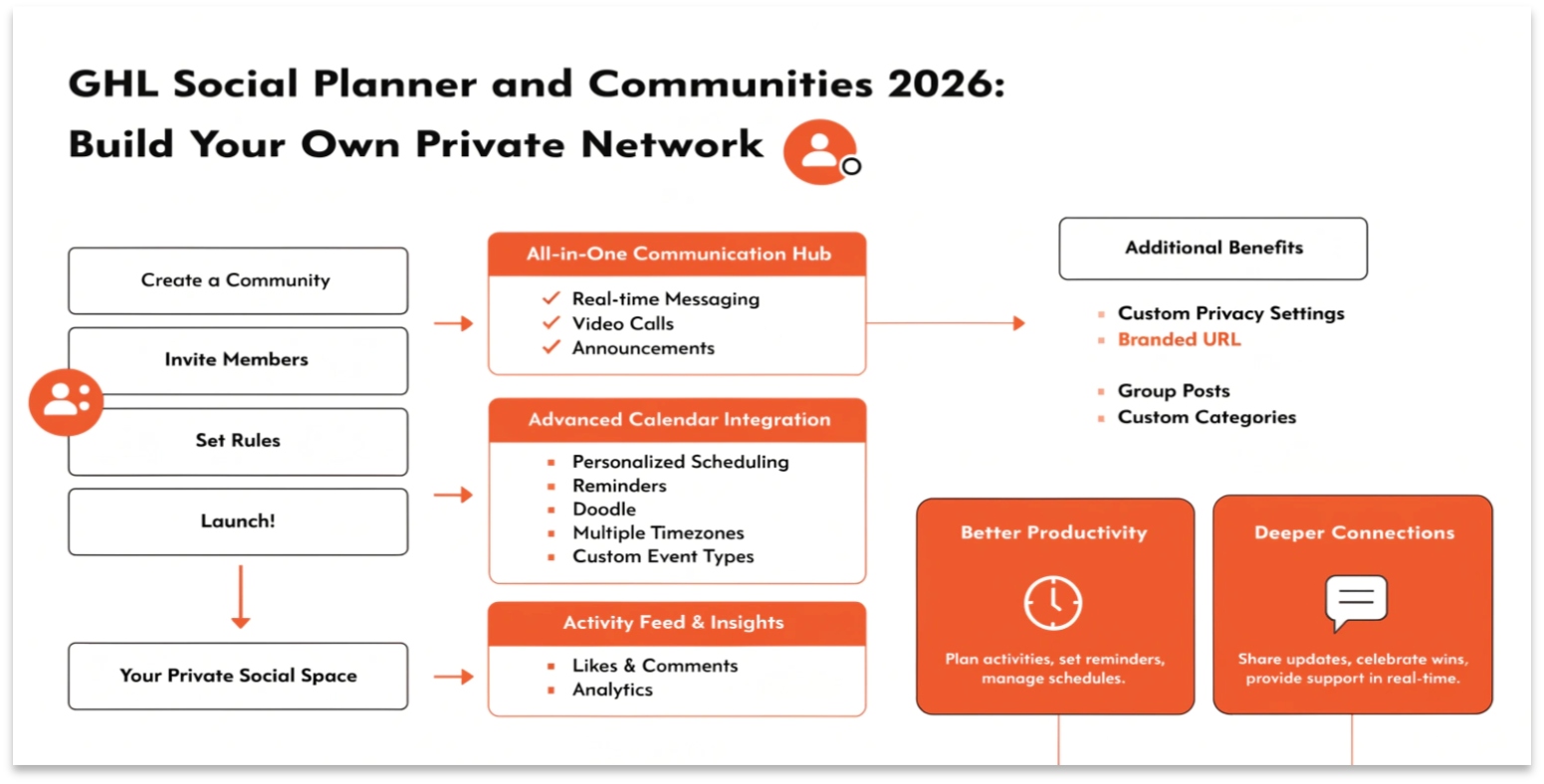
GHL Social Planner and Communities 2026: Build Your Own Private Network
In 2026, social media is changing. Large platforms like Facebook and Instagram are becoming crowded and expensive. Smart business owners are moving their best followers into “Private Communities.”
GoHighLevel (GHL) gives you the tools to do both. You can schedule your social media posts to attract new people, and then invite them into your own private group. In this guide, we will show you how to master the Social Planner and the new Communities features.
The GHL Social Planner: Your Content Hub
The Social Planner is a tool that lets you post to all your accounts at once. In 2026, it supports Facebook, Instagram, LinkedIn, X (Twitter), TikTok, and Google Business Profile.
New for 2026: The Social Template Library
You no longer have to start with a blank screen. GHL now includes a Template Library.
Communities: The “Skool” Killer
In 2026, GHL “Communities” is the top choice for hosting groups and courses. It looks and feels like a private social network.
Read this: GHL New Features 2026: The Complete Guide to the New E-commerce and Gift Card Tools
Why Build a Community in GHL?
Fresh Updates (March 2026)
GHL just released several major updates to the Communities feature to make it more professional.
The @everyone Tag
You can now use the @everyone mention. This sends a notification to every single member of your group at once. This is perfect for big announcements or live event reminders.
Custom Themes and Dark Mode
Your community no longer has to look like everyone else’s.
The “Home Timeline”
Just like a “News Feed,” the Home Timeline shows members the most popular posts from all the different channels in your group. This keeps the community active and exciting.
Comparison: GHL Communities vs. Facebook Groups
| Feature | GHL Communities | Facebook Groups |
| Data Ownership | You own the emails/data | Facebook owns the data |
| Ads | Zero Ads | Lots of Ads |
| Notifications | High (Email + In-App) | Low (Filtered by Algorithm) |
| Privacy | High (Private Portal) | Medium |
| Cost | Included in GHL | Free |
How to Use the Social Planner on Mobile
In 2026, you don’t need to be at your desk to manage your social media. The GHL Mobile App now has full Social Planner access.
Training Your Community AI Agent
You can now place an AI Agent inside your community to act as a moderator.
Most Searched Social & Community Questions (FAQs)
Can I host my online course inside a community?
Yes! You can link your GHL Courses (Memberships) directly to your Community. This allows members to talk about the lessons as they learn.
Does the Social Planner support Instagram Stories?
Yes. In 2026, you can schedule posts, reels, and stories for Instagram directly through GHL.
Is there a limit on how many members I can have?
No. GHL allows unlimited members in your communities. Whether you have 10 people or 10,000, the price stays the same.
How do I stop “Spam” in my group?
You can set your group to “Private.” This means you must manually approve every person who wants to join. You can also ask “Joining Questions” to filter out bots.
Strategy: The “Community Funnel”
The best way to use these tools in 2026 is to build a funnel that leads to your community.
Technical Tips for Success
Read this: GHL Workflows and AI Agents: Build Your AI Workforce in 2026
Conclusion: Owning Your Audience
In 2026, the most valuable thing a business can own is an Attention Asset. By using the GHL Social Planner and Communities, you are building a bridge between the public internet and your private business.
Don’t leave your followers on platforms you don’t control. Bring them home to your GHL Community, where you can talk to them, teach them, and sell to them without any “algorithm” getting in the way.